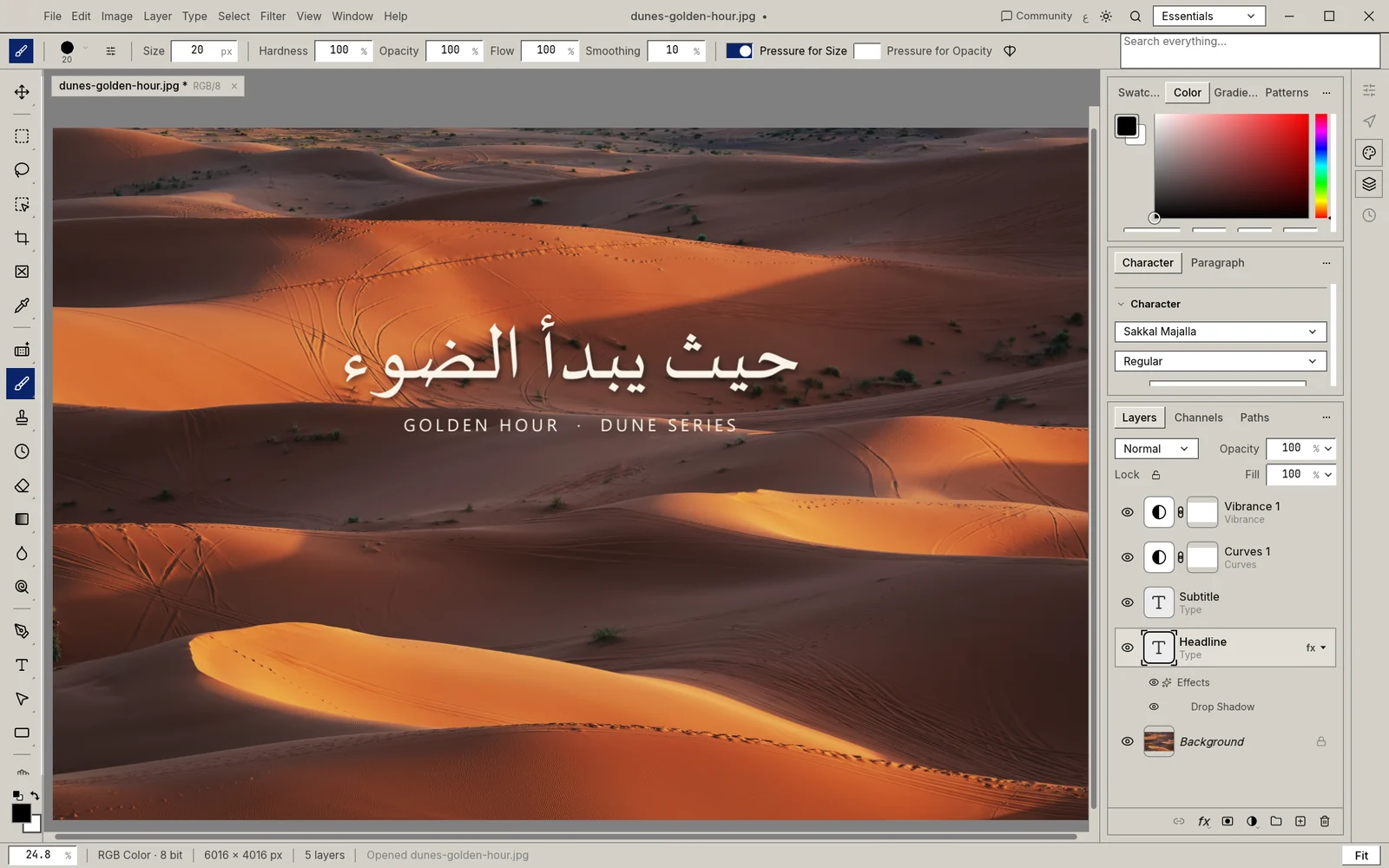
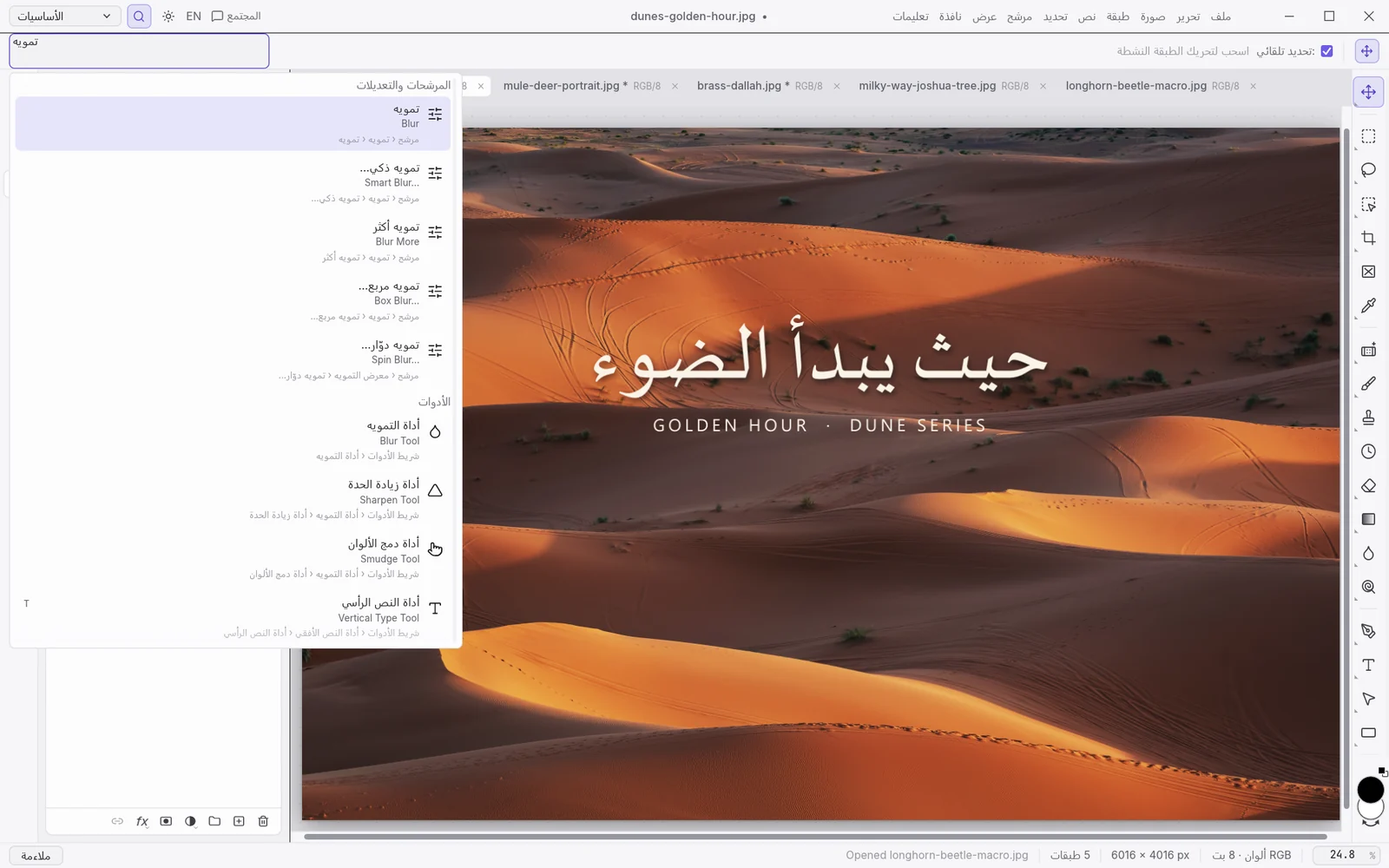
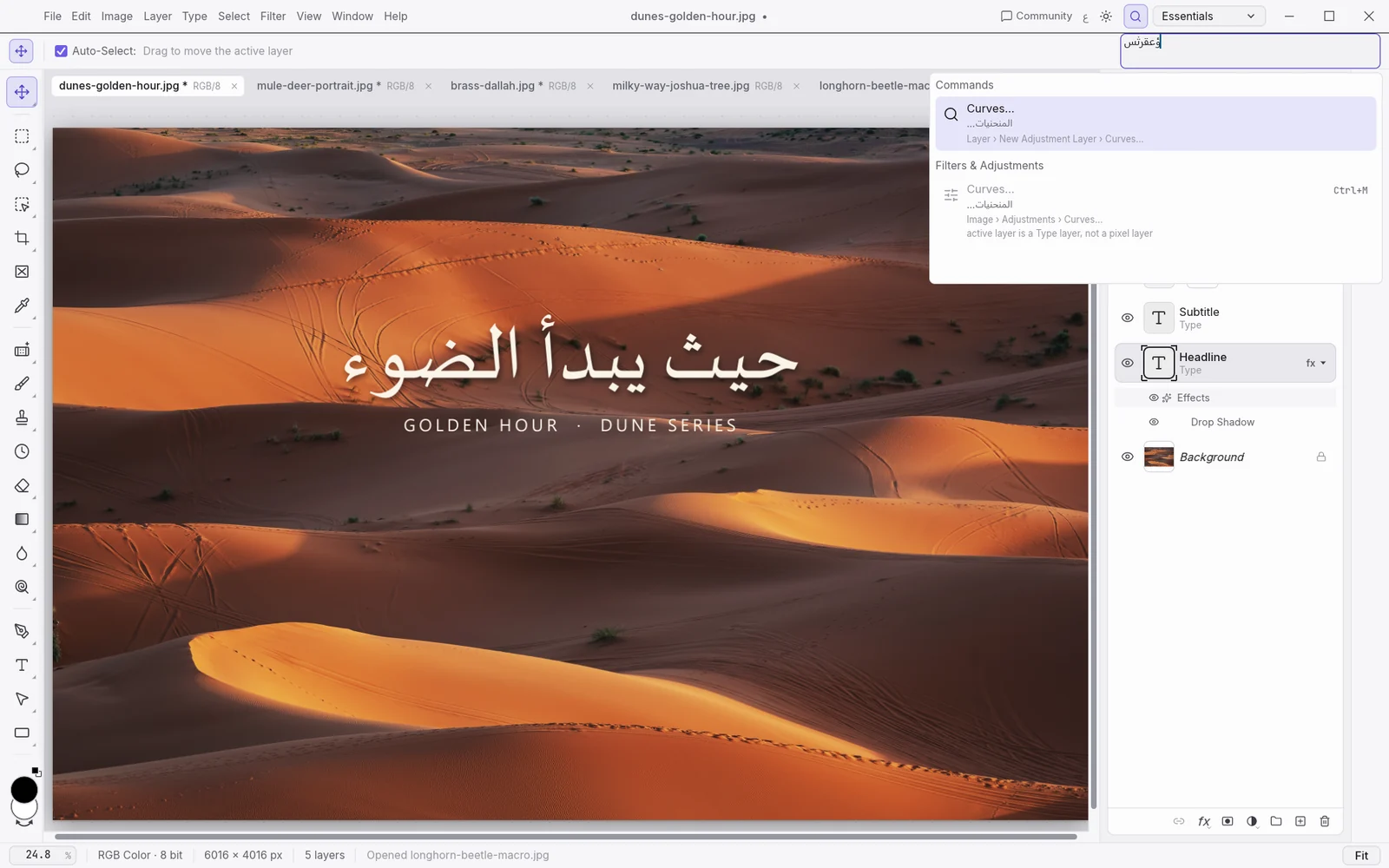
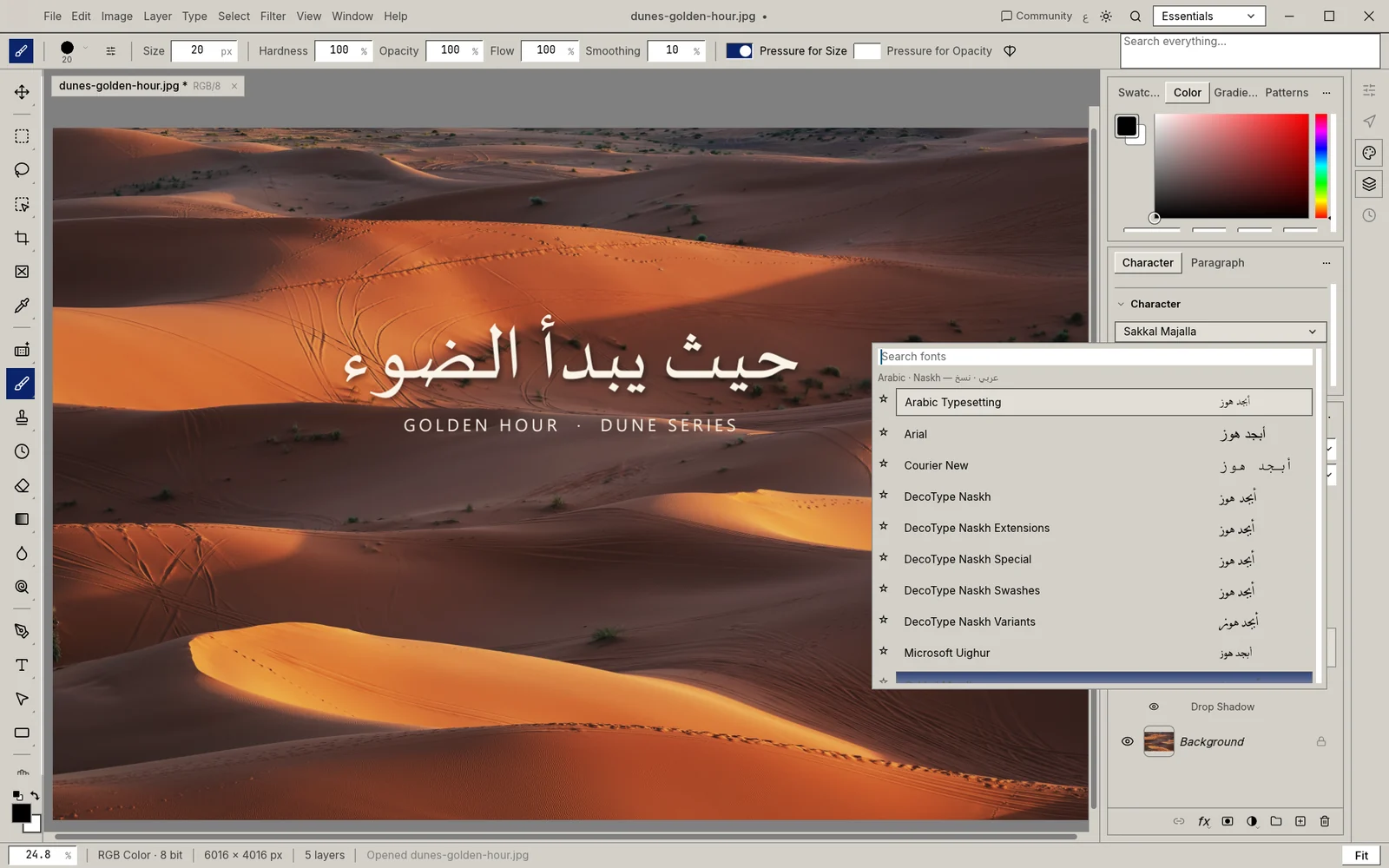
| Arabic and right-to-left |
|---|
| Arabic interface | ◐Partly: Yes, draft translationFull Arabic interface with a live EN ⇄ ع switch; the catalogue is a draft translation awaiting native-speaker review. | ✕No: No Arabic interfaceNo translated Arabic interface: the Middle Eastern edition has an English interface with Arabic text features. An Adobe community expert says Arabic menus ended after CS6. Source 1 ↗Source 2 ↗ | ◐Partly: Partial, about 55 %Arabic is incomplete: about 55 % of main interface messages (3,384 of 6,103) on GNOME's translation site, and about 37 % for plug-ins. Figures varied between two reads. Source 1 ↗ | ◐Partly: GIMP's partial translationPhotoGIMP adds no Arabic translation; the Arabic interface is GIMP's own incomplete one. Source 1 ↗Source 2 ↗ | ✕No: No official ArabicNo official Arabic interface; only old community language packs from the 4.0.9 era on the forum, which may not work with version 5. Source 1 ↗Source 2 ↗ | ◐Partly: Yes, about 93 % translatedAn Arabic translation exists; Hosted Weblate showed it 93.4 % translated on 2026-10-16. Source 1 ↗Source 2 ↗Source 3 ↗ | ✓Yes: Yes, fully translatedThe Arabic KDE translation shows 100 % (10,929 strings) on KDE's statistics page, updated 2026-10-16. Source 1 ↗ | ✓Yes: Yes, community translationAn Arabic interface translation exists; a 2024 issue listed wording errors, and the maintainer pointed to the community translation tool. Source 1 ↗ | ◐Partly: Listed, not seen liveArabic is in the official Editor language list, but the current editor page loaded in English with no visible language selector. Source 1 ↗Source 2 ↗ | ✕No: No Arabic interfaceArabic is not in the App Store languages list, so there is no translated Arabic interface. Source 1 ↗Source 2 ↗ | ✕No: No Arabic interfaceArabic is not among the listed interface languages. Source 1 ↗ | ✕No: No Arabic interfaceThe official pages mention no Arabic interface, and Wikipedia's language list, a third-party source, does not include Arabic either. Source 1 ↗Source 2 ↗ |
|---|
| Interface mirrors right-to-left | ◐Partly: Window mirrors; panels do notIn Arabic the window layout mirrors — menu bar, toolbox, options bar and panel dock; panel contents and dialogs stay left-to-right. Source 1 ↗Source 2 ↗ | ✕No: No, English layoutThe interface is not documented as mirroring; right-to-left applies only to paragraph direction in text layers. Source 1 ↗Source 2 ↗ | ◐Partly: Partly, through GTKGIMP 3.0 adds right-to-left layouts in various widgets and dialogs, and GTK sets direction from the system language; not a full mirror, as issue 11014 shows. Source 1 ↗Source 2 ↗Source 3 ↗ | ◐Partly: Same as GIMPSame as GIMP, because PhotoGIMP only changes configuration: right-to-left layouts in various widgets and dialogs, not a full mirror. Source 1 ↗Source 2 ↗Source 3 ↗ | ?Not verified: Not verifiedThe documentation lists Hebrew and Persian among built-in languages but does not say whether the interface mirrors; we found no official statement. Source 1 ↗ | ◐Partly: Likely through GTK; untestedPinta 3 is a GTK4 app, and GTK sets text direction from the system language, so standard widgets should mirror; this was not tested and Pinta makes no statement. Source 1 ↗Source 2 ↗ | ✓Yes: Yes, fully mirroredThe digiKam team tested and fixed the main right-to-left problems in 7.5.0; the announcement shows a fully mirrored Arabic interface. Source 1 ↗ | ✕No: No mirroringThe interface does not mirror: the maintainer closed the right-to-left request in October 2022, saying it seemed like too much work. Source 1 ↗ | ?Not verified: Not verifiedWe searched the official pages and support posts and found no statement on whether the Arabic interface mirrors right-to-left. | ✕No: NoNo Arabic or other right-to-left localisation is listed, so the interface does not mirror. Source 1 ↗ | ✕No: NoNo Arabic or other right-to-left localisation is listed, so the interface does not mirror. Source 1 ↗ | ?Not verified: Not verifiedNo official mention of a right-to-left interface; a 2011 forum topic on right-to-left display exists, but its replies were not read. |
|---|
| Arabic letters join, mixed text keeps its order | ✓Yes: Yes, joined and orderedArabic type is shaped and joined in correct right-to-left order on the canvas, with bidirectional word order kept in mixed lines. Source 1 ↗ | ✓Yes: Yes, mature engineThe Unified Text Engine (HarfBuzz shaping, FriBidi) joins Arabic and handles mixed direction since version 23; 2026 forum reports describe reversed text and a dynamic-text bug. Source 1 ↗Source 2 ↗ | ◐Partly: Pango; open cursor issueText uses Pango, and the manual describes a right-to-left option, but issue 416 reports Arabic and Hebrew cursor and layout problems with no confirmed fix. Source 1 ↗Source 2 ↗ | ◐Partly: Same as GIMPNot changed by PhotoGIMP: the same as GIMP (Pango, with right-to-left cursor issue 416 still open). Source 1 ↗ | ✕No: No reliable right-to-left textOn the official forum, creator Rick Brewster said the Text tool does not faithfully support right-to-left or bidirectional text; the thread is old and no later fix was found. Source 1 ↗ | ◐Partly: Through Pango; untestedThe Text tool lays out text with Pango, so Arabic joining and ordering come from Pango and HarfBuzz; alignment is left, centre or right only, and no Arabic test was found. Source 1 ↗Source 2 ↗ | ◐Partly: Through Qt; untestedInsert Text draws with Qt, which shapes Arabic and applies bidirectional order; no writing-direction setting is documented and no digiKam Arabic test was found. Source 1 ↗Source 2 ↗Source 3 ↗ | ✓Yes: Yes, since version 2.8The official 2.8 post adds right-to-left direction, bidirectional reordering and contextual shaping; earlier punctuation, vowel and copy-paste bugs in the tracker are all closed. Source 1 ↗Source 2 ↗Source 3 ↗Source 4 ↗ | ?Not verified: Not verifiedWe found no official or forum statement on Arabic letter joining or bidirectional text in Pixlr's text tool. | ?Not verified: Not verifiedWe found no Apple documentation of Arabic shaping; one Mac App Store review, a third-party report, mentions lines between joined letters when Arabic text is stroked. Source 1 ↗ | ?Not verified: Not verifiedWe found no documentation of Arabic joining or bidirectional ordering in Acorn's text tool. | ?Not verified: Not verifiedWe found no official documentation of Arabic joining or bidirectional text; a 2011 forum topic exists but was not read. |
|---|
| Arabic fonts and type controls | ◐Partly: Arabic-first menu; no kashidaArabic-first font menu grouped by calligraphic style, and a separate Arabic font beside the Latin font in each text run; no kashida or diacritic-position controls yet. | ✓Yes: Yes: kashida and diacriticsKashida insertion (justified paragraphs only), justification alternates and diacritic position controls; Adobe Arabic, Myriad Arabic and Adobe Naskh support the alternates. Source 1 ↗ | ?Not verified: Not verifiedWe searched GIMP's official pages and documentation on 2026-10-16 and found no statement on Arabic font handling, kashida or diacritics. | –Not applicable: Not applicable (uses GIMP)PhotoGIMP only changes GIMP's configuration; this feature is GIMP's own. Source 1 ↗ | ?Not verified: Not verifiedWe searched Paint.NET's official pages and documentation on 2026-10-16 and found no statement on Arabic font handling, kashida or diacritics. | ◐Partly: Any installed font; no extrasThe Text tool uses the standard GTK font chooser, so any installed Arabic font can be picked; no Arabic fonts are bundled, and kashida or diacritics are not documented. Source 1 ↗ | ?Not verified: Not verifiedWe searched digiKam's official pages and documentation on 2026-10-16 and found no statement on Arabic font handling, kashida or diacritics. | ◐Partly: Arabic fonts; no language settingArabic fonts such as Amiri are available; tracker issues note missing fonts when opening PDFs and no language selector in text settings. Source 1 ↗Source 2 ↗Source 3 ↗ | ?Not verified: Not verifiedWe searched Pixlr's official pages and documentation on 2026-10-16 and found no statement on Arabic font handling, kashida or diacritics. | ?Not verified: Not verifiedWe searched Pixelmator Pro's official pages and documentation on 2026-10-16 and found no statement on Arabic font handling, kashida or diacritics. | ?Not verified: Not verifiedWe searched Acorn's official pages and documentation on 2026-10-16 and found no statement on Arabic font handling, kashida or diacritics. | ?Not verified: Not verifiedWe searched PhotoLine's official pages and documentation on 2026-10-16 and found no statement on Arabic font handling, kashida or diacritics. |
|---|
| Arabic-Indic digits and Hijri dates | ✕No: NoArabic-Indic digits and Hijri dates are not available in XiKey Photo; they exist only in a shared XiKey library that this app does not use yet. | ◐Partly: Digit choice; no HijriChoose Arabic, Hindi or Farsi digits (Arabic editions default to Hindi digits); we found no Hijri calendar feature on Adobe's pages. Source 1 ↗ | ?Not verified: Not verifiedWe searched GIMP's official pages and documentation on 2026-10-16 and found no statement on Arabic-Indic digits or Hijri dates. | –Not applicable: Not applicable (uses GIMP)PhotoGIMP only changes GIMP's configuration; this feature is GIMP's own. Source 1 ↗ | ?Not verified: Not verifiedWe searched Paint.NET's official pages and documentation on 2026-10-16 and found no statement on Arabic-Indic digits or Hijri dates. | ?Not verified: Not verifiedWe searched Pinta's official pages and documentation on 2026-10-16 and found no statement on Arabic-Indic digits or Hijri dates. | ?Not verified: Not verifiedWe searched digiKam's official pages and documentation on 2026-10-16 and found no statement on Arabic-Indic digits or Hijri dates. | ?Not verified: Not verifiedWe searched Photopea's official pages and documentation on 2026-10-16 and found no statement on Arabic-Indic digits or Hijri dates. | ?Not verified: Not verifiedWe searched Pixlr's official pages and documentation on 2026-10-16 and found no statement on Arabic-Indic digits or Hijri dates. | ?Not verified: Not verifiedWe searched Pixelmator Pro's official pages and documentation on 2026-10-16 and found no statement on Arabic-Indic digits or Hijri dates. | ?Not verified: Not verifiedWe searched Acorn's official pages and documentation on 2026-10-16 and found no statement on Arabic-Indic digits or Hijri dates. | ?Not verified: Not verifiedWe searched PhotoLine's official pages and documentation on 2026-10-16 and found no statement on Arabic-Indic digits or Hijri dates. |
|---|
| Interface languages | ✓Yes: 22 languages, live switch22 interface languages (English plus 21, including Arabic, Japanese, Korean and Chinese), switchable without restarting; engine error messages stay in English. Source 1 ↗Source 2 ↗ | ◐Partly: About 24; no ArabicAbout 24 interface languages, including German, Japanese, Korean, Turkish and Vietnamese; the Arabic and Hebrew editions use an English interface. Source 1 ↗ | ✓Yes: 86 languagesAvailable in 86 languages; 33 were updated in version 3.2. Source 1 ↗ | ◐Partly: GIMP's languagesUses GIMP's interface languages and the system language by default; its README is translated into about ten languages, not Arabic. Source 1 ↗Source 2 ↗ | ✓Yes: 34 built-in languages34 built-in languages according to the documentation, with more through community packs. Source 1 ↗ | ✓Yes: About 70 languagesTranslated into about 70 languages on Hosted Weblate. Source 1 ↗ | ✓Yes: 61 languagesInterface in 61 languages; online documentation in 17. Source 1 ↗ | ◐Partly: About 42, reportedAbout 42 interface languages, as reported by Wikipedia; the official list could not be fetched. Source 1 ↗Source 2 ↗ | ◐Partly: 28 in Editor; Express EnglishAn official support post says Pixlr Editor supports 28 languages and Express is English only; the post is old and may be outdated. Source 1 ↗ | ✓Yes: 11 languagesEnglish plus ten: French, German, Italian, Japanese, Korean, Portuguese, Russian, Simplified and Traditional Chinese, and Spanish. Source 1 ↗ | ✓Yes: 7 languagesEnglish, French, German, Italian, Polish, Russian and Spanish. Source 1 ↗ | ◐Partly: 5 languages, reportedFive interface languages (English, German, Chinese, French, Italian), as reported by Wikipedia; official manuals are in English, German and Italian. Source 1 ↗Source 2 ↗ |
|---|
| Guides and support | ◐Partly: Arabic and English guidesXiKey publishes English and Arabic user guides (getting started, interface, shortcuts, Arabic, FAQ); there is no support SLA, and 579 issues remain open in the base project. Source 1 ↗Source 2 ↗ | ◐Partly: Broad help; Arabic unconfirmedThe Help Center is localised for many regions; Arabic and Hebrew type are documented on English pages, and Arabic-language help was not confirmed. Source 1 ↗Source 2 ↗ | ◐Partly: Manual in 43 languagesThe official manual is offered in 43 languages, plus developer docs; Arabic is not among them, and the Arabic team page shows 0 % of documentation translated. Source 1 ↗Source 2 ↗ | ◐Partly: README only; no ArabicA README with about ten translations (Spanish, Hebrew, Korean, Chinese, Russian and others); none in Arabic. Source 1 ↗ | ◐Partly: Documentation and forumOfficial documentation and forum; translations are managed on Crowdin. Source 1 ↗ | ◐Partly: Release notes, no manualThe site has a home page and release notes; no user manual or FAQ was found. Support is through GitHub issues and discussions. Source 1 ↗Source 2 ↗ | ◐Partly: Documentation in 17 languagesOnline documentation in 17 languages; Hebrew and Slovene were added in 9.0. Source 1 ↗ | ✓Yes: Guides, blog, API, trackerOfficial learn pages, a blog, API documentation and a public issue tracker with developer replies. Source 1 ↗Source 2 ↗ | ◐Partly: Support blog postsOfficial support blog posts exist; their depth was not assessed. Source 1 ↗ | ◐Partly: Apple user guidesApple Support user guides for Mac and iPad; guide languages other than English were not verified. Source 1 ↗ | ◐Partly: English manual, email supportAn online manual in English; support by email. Source 1 ↗ | ◐Partly: Manuals in 3 languagesManuals in English, German and Italian, plus a user forum with developer replies. Source 1 ↗ |
|---|
| Cost, platforms and privacy |
|---|
| Price | ✓Yes: Free in Alpha; $39/year laterFree during Alpha. From Beta: $39/year ($19.50 the first year) or $4.99/month; students $9/year; also in the XiKey Creative bundle at $79/year. Source 1 ↗ | ✓Yes: Subscription from $22.99/monthSubscription only: Photoshop alone is US$22.99/month on an annual plan (US$263.88/year prepaid); Creative Cloud Pro is US$69.99/month; 7-day trial. Source 1 ↗ | ✓Yes: FreeFree of charge; community-developed free software. Source 1 ↗ | ✓Yes: FreeA free patch on GitHub; it needs GIMP, which is also free. Source 1 ↗ | ✓Yes: Free; paid Store editionFreeware with an optional donation; a paid Microsoft Store edition also exists. Source 1 ↗ | ✓Yes: FreeFree and open source. Source 1 ↗ | ✓Yes: FreeFree and open source, part of the KDE family. Source 1 ↗ | ◐Partly: Free with ads; Premium extraFree with ads. Premium removes ads and adds AI credits for about $5/month or $50/year, as reported by Costbench; no official pricing page was found. Source 1 ↗Source 2 ↗ | ◐Partly: Free with ads; plans extraFree with ads. Plus is $1.99/month, Premium $7.99/month and Ultra $19.99/month when billed yearly; monthly billing costs more. Source 1 ↗ | ✓Yes: $12.99/month or $49.99 onceIn Apple Creator Studio at US$12.99/month or US$129/year; Apple also lists a US$49.99 one-time Mac version. Source 1 ↗Source 2 ↗ | ✓Yes: $29.99 one-timeUS$29.99 one-time purchase with no subscription; 14-day trial. Source 1 ↗Source 2 ↗ | ✓Yes: €79 one-timeEUR 79 one-time per platform (Windows or macOS); one registration covers several computers of one user; 30-day trial. Source 1 ↗Source 2 ↗ |
|---|
| Licence and source code | ◐Partly: Open base, paid productThe open-source code base and XiKey's shared components are MIT OR Apache-2.0, but XiKey Photo is sold by subscription from Beta and its own public source repository is not set up yet. Source 1 ↗Source 2 ↗ | ✕No: ProprietaryProprietary and subscription-licensed; not open source. Source 1 ↗ | ✓Yes: Open source (GPL)Free software under the GNU General Public License. Source 1 ↗ | ◐Partly: Open project; licence unreadAn open project on GitHub; its licence text was not read in this research. Source 1 ↗ | ✕No: Freeware, closed sourceFreeware; its source code is not published under a free licence. Source 1 ↗ | ✓Yes: Open source (MIT)MIT licence; some Paint.NET 3.36 code is reused under MIT with its original headers. Source 1 ↗Source 2 ↗Source 3 ↗ | ✓Yes: Open source (GPL)GNU GPL 2.0 or later; the manual is under the GNU FDL. Source 1 ↗Source 2 ↗ | ✕No: Proprietary freewarePhotopea is proprietary freeware; some components such as Typr.js are open source, and its GitHub repository is only an issue tracker. Source 1 ↗Source 2 ↗ | ✕No: ProprietaryA proprietary, closed-source service. Source 1 ↗ | ✕No: ProprietaryProprietary and closed source. Source 1 ↗ | ✕No: ProprietaryProprietary one-time purchase; not open source. Source 1 ↗ | ✕No: ProprietaryProprietary shareware; not open source. Source 1 ↗ |
|---|
| Platforms | ✓Yes: Windows, macOS, LinuxWindows x64 and ARM64, macOS and Linux (AppImage, deb, rpm, tarball, Flatpak). The code base also builds for FreeBSD and the web, which XiKey does not ship. Source 1 ↗ | ✓Yes: Windows, macOS, web, mobileWindows and macOS desktop, plus web and mobile Photoshop in the plan; no Linux. Source 1 ↗ | ✓Yes: Windows, macOS, LinuxDesktop builds for Linux, Windows and macOS; no web version. Source 1 ↗Source 2 ↗ | ✓Yes: Wherever GIMP 3 runsA configuration patch for GIMP 3 on Linux (Flatpak or native), Windows and macOS. Source 1 ↗ | ◐Partly: Windows onlyWindows 10 21H2 and Windows 11, x64 and ARM64 only. Source 1 ↗ | ✓Yes: Linux, Windows, macOS, OpenBSDLinux (Flatpak, Snap), Windows, macOS including Apple silicon, and OpenBSD; 3.1 adds a Windows ARM64 installer. Source 1 ↗Source 2 ↗ | ✓Yes: Linux, Windows, macOSLinux (AppImage), 64-bit Windows 10 or later, and macOS on Intel and Apple silicon. Source 1 ↗ | ◐Partly: Any browser; no appRuns in desktop, tablet and phone browsers; no native desktop or mobile app was found. Source 1 ↗ | ✓Yes: Web, iOS, Android, desktopWeb apps (Express and Editor), iOS and Android apps, and a desktop version listed on the home page. Source 1 ↗ | ✓Yes: macOS and iPadOS onlymacOS 26 and iPadOS 26 for the Creator Studio version; the one-time Mac version needs macOS 12. No Windows, Linux or web. Source 1 ↗Source 2 ↗ | ✓Yes: macOS onlymacOS 14 or later, universal binary for Apple silicon; no Windows, Linux, web or iPad. Source 1 ↗Source 2 ↗ | ✓Yes: Windows and macOSWindows 10/11 (x64 and ARM) and macOS 10.13 or later (Intel and Apple silicon); no native Linux. Source 1 ↗Source 2 ↗ |
|---|
| Works offline, no account | ✓Yes: Offline, no accountRuns fully offline with no sign-in: the app contains no HTTP or TLS client, and smart selection runs locally. Licensing for paid Beta is not built yet. Source 1 ↗Source 2 ↗ | ◐Partly: Adobe ID; 99 days offlineAdobe ID sign-in is required; the licence revalidates every 30 days, and offline use is allowed for up to 99 days on annual plans, 30 days on monthly ones. Source 1 ↗ | ✓Yes: Offline, no accountNo account is needed and it works offline; only optional update checks and user-initiated remote file loading use the network. Source 1 ↗Source 2 ↗ | ✓Yes: Offline, no accountLocal configuration files copied into GIMP's folder; no account. Source 1 ↗ | ✓Yes: Offline, no accountNo account is required; apart from update checks, which can be turned off, and an anonymous install report, nothing is sent. The Store edition installs through Microsoft Store. Source 1 ↗ | ✓Yes: Offline, no accountA native desktop app; no account or online service appears in the repository or website. Source 1 ↗Source 2 ↗ | ✓Yes: Offline, no accountA local desktop app; digiKam says photos, metadata and settings stay on your device and its AI tools run locally. No account is mentioned. Source 1 ↗ | ✓Yes: Works offline once loadedThe official learn page says you can load Photopea, disconnect and keep working offline; editing needs no account. Source 1 ↗ | ◐Partly: Cloud-first; offline unconfirmedMarketed as a cloud-based editor; a desktop version exists, but offline use is not officially confirmed. Source 1 ↗Source 2 ↗ | ?Not verified: Not verifiedApple offers a 30-day Creator Studio trial; we found no official details on offline use or sign-in requirements. | ◐Partly: No account; offline unstatedNo subscription; registration uses a serial number (none for App Store copies) and Acorn sends no images over the network. Offline activation is not stated. Source 1 ↗ | ?Not verified: Not verifiedPhotoLine uses a registration key; we found no official statement on whether it works fully offline. |
|---|
| Privacy and telemetry | ✓Yes: No telemetryNo telemetry, analytics or crash reporting in the code and no network client; the only listener is an opt-in, token-protected local control port. Source 1 ↗Source 2 ↗ | ◐Partly: Opt-outs availableAdobe offers an account-level opt-out from content analysis and says it does not analyse locally stored content; usage-data sharing is a separate setting. Source 1 ↗ | ✓Yes: No trackingThe privacy policy says GIMP collects, transmits and shares no personal data and has no ads or trackers. Source 1 ↗ | ✓Yes: No tracking, as GIMPPhotoGIMP is configuration files only, so GIMP's privacy policy applies: no personal data collected and no trackers. Source 1 ↗Source 2 ↗ | ◐Partly: Anonymous update and install pingsNo personal data is collected; the Classic edition checks for updates (this can be disabled) and anonymously reports completed installs. Third-party plug-ins fall outside the policy. Source 1 ↗ | ?Not verified: Not verifiedWe searched Pinta's official pages and documentation on 2026-10-16 and found no statement on privacy or telemetry. | ✓Yes: No telemetryThe About page says digiKam has no tracking, analytics or telemetry, and data stays on the device. Source 1 ↗ | ◐Partly: Local files; ads in free tierThe policy says opened files never leave the device and one preference cookie is used; signing in syncs name, email and preferences. Ad trackers in the free tier are not addressed. Source 1 ↗ | ✕No: Ads and analyticsThe policy describes cookies, advertising partners and analytics, and AI inputs grant Pixlr a broad perpetual licence. Source 1 ↗Source 2 ↗ | ◐Partly: Crash data only (older listing)The older one-time Mac listing shows only crash diagnostics, not linked to identity; the Creator Studio listing's privacy labels were not verified. Source 1 ↗ | ✓Yes: Collects no dataThe App Store privacy label says the developer collects no data from this app. Source 1 ↗ | ?Not verified: Not verifiedWe searched PhotoLine's official pages and documentation on 2026-10-16 and found no statement on privacy or telemetry. |
|---|
| Updates | ◐Partly: Manual for nowNo in-app update check yet; XiKey turned off the code base's GitHub update feed, and signed updates through XiKey Launcher are in progress. Source 1 ↗ | ✓Yes: Monthly, via Creative CloudDelivered through the Creative Cloud desktop app; point releases come roughly monthly, as reported by CG Channel (27.8 in June, 27.11 in October 2026). Source 1 ↗ | ◐Partly: Manual downloadsStable 3.2 shipped on 14 March 2026; updates come as manual downloads or through package managers. Source 1 ↗ | ◐Partly: May lag GIMP 3.23.1 is the latest; issue #194 reports it targets GIMP 3.0's configuration folder and may not apply on GIMP 3.2 or later. Source 1 ↗ | ✓Yes: Regular releases5.1.12 stable shipped on 2026-03-08, with 5.2 alpha builds through August 2026. Source 1 ↗ | ✓Yes: Regular releases3.1 shipped on 2025-12-23 and 3.1.1 in January 2026; Wikipedia reports 3.1.2 on 2026-04-02. Source 1 ↗ | ✓Yes: Regular releases9.0.0 shipped on 2026-03-08 and 9.1.0 on 2026-06-07; Qt5 builds are being retired on Windows and Linux. Source 1 ↗ | ✓Yes: Continuous, in the browserThe web app is updated on the server; there is no installer or update channel. Source 1 ↗ | ✓Yes: Continuous web updatesThe web service is updated continuously, with new AI models added regularly. Source 1 ↗ | ✓Yes: Every 2–3 months, App StoreUpdated through the Mac App Store every two to three months (4.2 in April, 4.3 in June, 4.4 in September 2026). Source 1 ↗ | ✓Yes: Free point updatesFree point updates through the Mac App Store or direct download; 8.7 shipped in October 2026. Source 1 ↗Source 2 ↗ | ◐Partly: Manual downloadsManual downloads from the vendor's site; 25.0 shipped in January 2025, and 25.50 is current. Source 1 ↗Source 2 ↗ |
|---|
| Core editing |
|---|
| Layers and masks | ✓Yes: Full layers and masksGroups, clipping masks, pixel and vector masks, fill and adjustment layers, smart objects, channels, Quick Mask, 27 Photoshop blend modes, locks and colour labels. Source 1 ↗ | ✓Yes: Full layers and masksA full layer and mask system, a long-established core feature. Source 1 ↗ | ✓Yes: Layers, groups and masksLayers, layer groups, masks and channels are core features; 3.2 adds link layers and vector layers. Source 1 ↗ | –Not applicable: Not applicable (uses GIMP)PhotoGIMP only changes GIMP's configuration; this feature is GIMP's own. Source 1 ↗ | ◐Partly: Layers; no masks or groupsLayers with blend modes; layer groups are planned for 6.0, with mask layers later, according to the roadmap. Source 1 ↗ | ◐Partly: Layers; masks unconfirmedLayers are supported (3.1 adds a layer context menu); layer masks were not confirmed. Source 1 ↗ | –Not applicable: No layers (photo manager)The image editor has no layers; digiKam is a photo manager with a corrective editor. Source 1 ↗ | ✓Yes: Layers, masks, blendingLayers, masks and blending are listed among its core features. Source 1 ↗Source 2 ↗ | ✓Yes: Layers and masksLayers, blend modes and masks, as reported by an iPhotography review; the official page shows selection and transform tools. Source 1 ↗ | ✓Yes: Layers and masksLayer-based editing with masks, plus Select and Mask with Quick Selection and Refine Edge brushes. Source 1 ↗Source 2 ↗ | ✓Yes: Layers and masksLayers with blend modes and masking, documented in the manual. Source 1 ↗ | ✓Yes: Layers and masksLayer-based editing with adjustment layers and masks, as listed by the vendor. Source 1 ↗ |
|---|
| Non-destructive editing | ✓Yes: Adjustment layers, smart filters16 adjustment layer types and smart objects with editable smart filters and lossless transforms; smart-filter rendering matches Photoshop in only 5 of 30 test files. Source 1 ↗Source 2 ↗ | ✓Yes: Adjustment layers, Smart ObjectsAdjustment layers, Smart Objects and Smart Filters are core features; October 2025 added a Color and Vibrance adjustment layer. Source 1 ↗Source 2 ↗ | ◐Partly: Non-destructive filtersNon-destructive GEGL filters since 3.0; 3.2 extends them to channels, groups and new layer types, and pass-through groups act like adjustment layers. Source 1 ↗ | ✕No: Adds nothingAdds no adjustment layers or smart objects; non-destructive features are GIMP's own. Source 1 ↗ | ✕No: NoNo adjustment layers or non-destructive filters; the roadmap plans them after layer folders in 6.0. Undo history is the only safety net. Source 1 ↗Source 2 ↗ | ✕No: NoAdjustments and effects are applied to pixels after a preview; there are no adjustment layers or smart objects, only undo history. Source 1 ↗Source 2 ↗ | ◐Partly: Versioning keeps originalsImage versioning keeps the original in the editor and batch queue; the editor has no layers, so there are no adjustment layers. Source 1 ↗ | ◐Partly: Smart objectsSmart objects are listed on the learn page; adjustment layers were not confirmed separately. Source 1 ↗ | ◐Partly: Editable text and shapes onlyAdjustments and filters change pixels; text, shape and element layers stay editable until rasterised, and masks exist. No adjustment layers or smart objects are listed. Source 1 ↗ | ✓Yes: Non-destructive effectsApple describes non-destructive editing with effects, fills, strokes and shadows. Source 1 ↗ | ✓Yes: Non-destructive filtersNon-destructive filters, curves and levels are listed by the vendor. Source 1 ↗ | ✓Yes: Adjustment layersAdjustment layers are listed by the vendor. Source 1 ↗ |
|---|
| Layer styles | ✓Yes: Full Photoshop-style setDrop and inner shadow, outer and inner glow, bevel and emboss, satin, stroke, and colour, gradient and pattern overlays, live on any layer; styles copy and paste. Source 1 ↗Source 2 ↗ | ✓Yes: Full setLayer styles such as Drop Shadow and Bevel & Emboss, with contour editing and Global Light. Source 1 ↗ | ◐Partly: PSD import of three styles3.2 imports Drop Shadow, Inner Shadow and Outer Glow from PSD files; no native editable layer-style system was confirmed. Source 1 ↗ | –Not applicable: Not applicable (uses GIMP)PhotoGIMP only changes GIMP's configuration; this feature is GIMP's own. Source 1 ↗ | ?Not verified: Not verifiedLayer styles are absent from the official feature list and roadmap, which names only text, mask and adjustment layers as future work; we found no statement either way. Source 1 ↗Source 2 ↗ | ✕No: NoLayer properties are opacity, blend mode, visibility and name; there are no live shadows, strokes or glows. Source 1 ↗ | –Not applicable: Not applicableThe image editor has no layers, so layer styles do not apply. Source 1 ↗ | ✓Yes: YesLayer styles are listed among features on the learn page. Source 1 ↗ | ◐Partly: Effects, not live stylesDrop shadow, inner shadow, glows, outline and bevel are filter commands, not documented as live editable layer styles. Source 1 ↗ | ✓Yes: Effects, strokes, shadowsEffects, fills, strokes and shadows are non-destructive layer attributes. Source 1 ↗ | ✓Yes: YesThe manual lists layer styling options. Source 1 ↗ | ✓Yes: Yes, copyable between layersLayer styles include outline and glow effects with gradient bending, and styles copy between layers. Source 1 ↗Source 2 ↗ |
|---|
| Smart selection | ◐Partly: Smart, without machine learningQuick and Object Selection, Select Subject, Sky and Focus Area use classical local algorithms, not machine learning; Select and Mask is a dialog, not a workspace. Source 1 ↗Source 2 ↗ | ✓Yes: AI selectionObject Selection and Remove Background; 27.11 adds AI Enhance Edge for hair cut-outs, as reported by CG Channel. Source 1 ↗Source 2 ↗ | ◐Partly: Experimental Paint SelectPaint Select improved in 3.2 but remains experimental in the Playground; no AI subject selection was confirmed. Source 1 ↗ | –Not applicable: Not applicable (uses GIMP)PhotoGIMP only changes GIMP's configuration; this feature is GIMP's own. Source 1 ↗ | ✕No: No AI selectionNo AI features appear in the roadmap. Source 1 ↗ | ◐Partly: Classic tools onlyLasso (with a polygon mode in 3.1) and other classic selection tools; no AI selection. Source 1 ↗ | ◐Partly: Face detection onlyFace detection and recognition engines; no AI subject selection was found. Source 1 ↗ | ✓Yes: AI background removalAI background removal and Magic Replace are listed; the API docs say they use the Dezgo service. Source 1 ↗Source 2 ↗ | ✓Yes: AI selection and removalAI background removal, generative fill and advanced selection tools are listed. Source 1 ↗Source 2 ↗ | ✓Yes: ML selection, Smart RefineMachine-learning background removal and masking, with Smart Refine for hair and fur. Source 1 ↗Source 2 ↗ | ✓Yes: ML subject selectionMachine-learning subject selection is listed. Source 1 ↗ | ◐Partly: Classic, no AIAutomask, Mask Brush, Quick Selection and Border Matting; release notes mention no AI selection. Source 1 ↗Source 2 ↗ |
|---|
| Retouching and healing | ✓Yes: Full healing setRemove, Spot Healing, Healing, Patch, Content-Aware Move, Clone Stamp and Content-Aware Fill; Content-Aware Fill and Vanishing Point are simple dialogs, not workspaces. Source 1 ↗Source 2 ↗ | ✓Yes: Full set, plus RemoveSpot Healing with Content-Aware, Patch, Content-Aware Move and a dedicated Remove tool. Source 1 ↗Source 2 ↗ | ✓Yes: Clone, Heal, Perspective CloneThe 3.0 manual lists Clone, Heal and Perspective Clone tools. Source 1 ↗ | –Not applicable: Not applicable (uses GIMP)PhotoGIMP only changes GIMP's configuration; this feature is GIMP's own. Source 1 ↗ | ◐Partly: Clone Stamp, no healingClone Stamp, Recolor and red-eye removal; no healing brush or content-aware tool. Source 1 ↗ | ◐Partly: Clone Stamp, no healingClone Stamp and Recolor tools; no healing brush or patch tool. Source 1 ↗Source 2 ↗ | ✓Yes: Healing clone, restorationEnhancement tools include Healing Clone, Restoration, Red Eye and Hot Pixels. Source 1 ↗ | ✓Yes: Clone, Spot Healing, PatchClone Stamp, Spot Healing Brush, Healing Brush and Patch tools are documented. Source 1 ↗Source 2 ↗ | ✓Yes: Clone and healClone and heal tools are listed. Source 1 ↗ | ✓Yes: Repair and CloneA Repair tool removes blemishes and objects using surrounding detail, plus a Clone tool; there is no separate Heal tool. Source 1 ↗Source 2 ↗ | ✓Yes: Healing, Repair, Synth FillHealing brush and object removal; 8.7 adds Repair spot healing and Synth Fill. Source 1 ↗Source 2 ↗ | ✓Yes: Copy, healing, remove brushesCopy, healing and remove brushes with source options such as source layer, active and below, or all layers. Source 1 ↗ |
|---|
| Filters and effects | ✓Yes: Full Photoshop filter menuEvery Photoshop Filter menu item is present, including Blur Gallery, Liquify, Lens Correction, Oil Paint, Lighting Effects and 47 Filter Gallery looks, with live preview. Source 1 ↗Source 2 ↗ | ✓Yes: Filters, smart and neuralFilter Gallery, non-destructive Smart Filters and AI-based Neural Filters. Source 1 ↗Source 2 ↗Source 3 ↗ | ✓Yes: Large GEGL setA large GEGL filter set, with a new filter browser and a Vibrance filter in 3.2. Source 1 ↗ | –Not applicable: Not applicable (uses GIMP)PhotoGIMP only changes GIMP's configuration; this feature is GIMP's own. Source 1 ↗ | ✓Yes: Many effectsMany adjustments and effects; 5.2 alpha adds Linocut, Mosaic, Pointillism and Waves. Source 1 ↗ | ✓Yes: Growing effect set3.0 added Dithering, Voronoi, Vignette and more; 3.1 adds Cells. Source 1 ↗ | ✓Yes: Corrective filters, G'MICCurves, levels, white balance and black-and-white tools with histograms, plus G'MIC-Qt filters. Source 1 ↗ | ✓Yes: Liquify, Puppet Warp and moreLevels, Curves, Gaussian Blur, Liquify and Puppet Warp are listed. Source 1 ↗ | ✓Yes: Blur, liquify, glitchBlur, sharpen, glitch effects, liquify, curves and levels. Source 1 ↗ | ✓Yes: 60+ effectsOver 60 creative effects (blur, distortion, tile) plus a Warp tool. Source 1 ↗Source 2 ↗ | ✓Yes: Extensive filtersExtensive filters from blur to distortion; 8.7 adds Temperature/Tint and High Pass. Source 1 ↗Source 2 ↗ | ✓Yes: Non-destructive filter layersAll effects and filters can be non-destructive through dynamic filter layers. Source 1 ↗ |
|---|
| Painting, brushes and pen tablets | ◐Partly: Rich brushes; tablet gapsPhotoshop-style brush engine with dynamics, dual brush, texture, smoothing and .abr presets; on Windows only pressure works (no tilt), the pen fails on Wayland, and brush lag is reported. Source 1 ↗Source 2 ↗ | ✓Yes: Brushes, pen pressureBrush Settings with pen pressure controlling size and opacity for Wacom-style tablets. Source 1 ↗Source 2 ↗ | ✓Yes: MyPaint brushes3.2 adds 20 MyPaint brushes and an Overwrite paint mode; tablet details were not read. Source 1 ↗ | ◐Partly: Adds bracket shortcutsAdds bracket-key brush-size shortcuts; the brush engine is GIMP's. Source 1 ↗ | ✓Yes: Pressure through Windows InkPen pressure through Windows Ink for Paintbrush, Eraser, Clone Stamp and Recolor; brushes have hardness, spacing and smoothing. Source 1 ↗Source 2 ↗ | ◐Partly: Basic brushesPaintbrush tools; 3.1 adds a Splatter brush that repeats while held. Source 1 ↗ | –Not applicable: Not applicableNot a painting tool; the editor is for photo correction. Source 1 ↗ | ◐Partly: Brushes; pressure variesBrush tools exist; pen pressure works with some tablets according to tracker issues, but it is undocumented and often not detected in some browser and tablet combinations. Source 1 ↗Source 2 ↗Source 3 ↗ | ✓Yes: Brushes with pen pressureBrush tools with a "Use pen pressure" option, plus eraser, clone, heal, blur and toning brushes. Source 1 ↗ | ✓Yes: Brushes, Apple PencilBrush tools with native Apple Pencil pressure support. Source 1 ↗ | ◐Partly: Brushes; pressure unverifiedPainting tools are documented; tablet pressure behaviour was not verified. Source 1 ↗ | ◐Partly: Dynamics; pressure unstatedBrush dynamics (random position, size, colour and angle) with live previews; tablet pressure is not stated. Source 1 ↗Source 2 ↗ |
|---|
| Photo and colour |
|---|
| Camera raw files | ◐Partly: Most RAW formats; no CR3Opens DNG, CR2, NEF, ARW, RW2, PEF and uncompressed ORF/RAF in a Camera Raw dialog; no CR3, compressed RAF, lossy DNG, XMP sidecars or lens profiles. Source 1 ↗Source 2 ↗ | ✓Yes: Adobe Camera RawRaw files open in Adobe Camera Raw inside Photoshop, with a published supported-cameras list. Source 1 ↗Source 2 ↗ | ◐Partly: Through plug-insRaw through darktable and RawTherapee plug-ins, plus ART support in 3.2. Source 1 ↗ | ✕No: Adds noneAdds no raw support and no Camera Raw equivalent. Source 1 ↗ | ✕No: NoRaw formats are not supported natively. Source 1 ↗ | ✕No: NoNo raw importer; formats are those of GdkPixbuf plus ORA, JPEG, TGA and PPM. Source 1 ↗ | ✓Yes: Yes, through LibRawLibRaw engine, updated in 9.0 and 9.1 for new cameras. Source 1 ↗Source 2 ↗ | ✓Yes: DNG, CR2, NEF and moreRaw formats such as DNG, CR2 and NEF are among its 40+ supported formats. Source 1 ↗ | ✕No: NoNo raw support was found; a Fastlancer review reports that neither editor handles raw well. Source 1 ↗ | ✓Yes: 750+ camerasRaw support for 750+ camera formats; 4.2 added more cameras. Source 1 ↗Source 2 ↗ | ✓Yes: Raw importRaw image import is listed. Source 1 ↗ | ✓Yes: Through LibRaw, reportedImports camera raw through LibRaw, as reported by Wikipedia. Source 1 ↗ |
|---|
| Colour management, CMYK and bit depth | ✓Yes: CMYK, Lab, 32-bit, ICCRGB, Grayscale, CMYK and Lab at 8, 16 and 32 bits per channel, ICC management with soft proofing and gamut warning; no spot plates or HDR display output. Source 1 ↗Source 2 ↗ | ✓Yes: CMYK, Lab, 32-bit, ICCRGB, CMYK, Lab and other modes at 8, 16 and 32 bits per channel, with ICC colour management. Source 1 ↗Source 2 ↗Source 3 ↗ | ◐Partly: Soft proofing; CMYK ink view3.2 shows CMYK total ink coverage and soft proofing, with linear-precision filters; ICC and bit-depth details were not itemised in the notes read. Source 1 ↗ | –Not applicable: Not applicable (uses GIMP)PhotoGIMP only changes GIMP's configuration; this feature is GIMP's own. Source 1 ↗ | ◐Partly: Improving in 5.2 alpha5.2 alpha adds CICP metadata, HDR tone mapping and better CMYK and colour-profile handling. Source 1 ↗ | ✕No: 8-bit RGB onlyAn 8-bit RGB canvas; no ICC, CMYK or high-bit-depth support. Source 1 ↗ | ◐Partly: Screen profiles8.8 added screen colour profile support on Windows, macOS and Wayland. Source 1 ↗ | ◐Partly: 16/32-bit; CMYK unverifiedMultiple colour spaces and 8, 16 or 32-bit depth are listed; ICC and CMYK details were not verified. Source 1 ↗ | ?Not verified: Not verifiedWe searched Pixlr's official pages and documentation on 2026-10-16 and found no statement on colour management, CMYK or bit depth. | ◐Partly: RGB 16-bit; CMYK on exportRGB at 8 or 16 bits per channel with ICC profiles; CMYK is only an export conversion. Source 1 ↗Source 2 ↗ | ✓Yes: CMYK, 16-bit, ICCThe manual lists colour management, including CMYK and 16-bit depth. Source 1 ↗ | ✓Yes: CMYK, Lab, 32-bit, ICCCMYK and Lab with ICC colour management, up to 16 or 32 bits per channel. Source 1 ↗ |
|---|
| GPU and performance | ◐Partly: GPU compositor; slow in placesGPU compositing (DX12, Metal, Vulkan) with CPU fallback and multithreaded filters, but 22 of 25 interactive speed targets are missed, and one 150-layer test crashed. Source 1 ↗Source 2 ↗ | ✓Yes: GPU acceleratedUses the GPU through D3D12 on Windows and Metal on macOS; Neural Filters and Object Selection are slower in CPU mode. Source 1 ↗Source 2 ↗ | ◐Partly: GPU path off by defaultGEGL processing; its OpenCL code was improved but stays disabled by default, with hardware acceleration planned to return later. Source 1 ↗ | –Not applicable: Not applicable (uses GIMP)PhotoGIMP only changes GIMP's configuration; this feature is GIMP's own. Source 1 ↗ | ✓Yes: Most effects on the GPUMost effects and adjustments run on the GPU; DirectX 11 is required. Source 1 ↗ | ?Not verified: Not verifiedWe searched official pages and source on 2026-10-16 and found no statement on GPU acceleration; 3.1 reworked the canvas widget for speed. | ◐Partly: GPU for AI, not filtersGPU rendering and OpenCL acceleration for face management and AI models; editing filters are not described as GPU-accelerated. Source 1 ↗Source 2 ↗ | ◐Partly: CPU and GPU in the browserThe home page says it runs on your device using the CPU and GPU. Source 1 ↗ | ?Not verified: Not verifiedWe searched Pixlr's official pages and documentation on 2026-10-16 and found no statement on GPU acceleration. | ✓Yes: Metal, Apple siliconThe engine uses Metal and Core Image for GPU-accelerated editing, optimised for Apple silicon. Source 1 ↗Source 2 ↗ | ✓Yes: Metal GPU filtersUses Metal 2 GPU power for filter and effect processing. Source 1 ↗ | ?Not verified: Not verifiedWe searched PhotoLine's official pages and documentation on 2026-10-16 and found no statement on GPU acceleration. |
|---|
| Type and vector |
|---|
| Text and typography | ◐Partly: Rich type; no type on pathEditable point, paragraph and vertical type, Character and Paragraph panels, kerning, variable fonts, Warp Text and Glyphs; no type on a path or paragraph-direction control. Source 1 ↗Source 2 ↗ | ✓Yes: Advanced typographyAdvanced typographic features for Latin, Arabic and Japanese; other scripts get shaping and common attributes. Source 1 ↗ | ✓Yes: On-canvas text editorOn-canvas text editing with bold and italic shortcuts; 3.2 adds outline options. Source 1 ↗ | –Not applicable: Not applicable (uses GIMP)PhotoGIMP only changes GIMP's configuration; this feature is GIMP's own. Source 1 ↗ | ◐Partly: Basic text toolA Text tool with multiple fonts, but its design predates multilingual support. Source 1 ↗Source 2 ↗ | ◐Partly: Basic text toolText tool with antialiasing and input-method pre-edit; 3.1 adds Ctrl+Backspace word delete. Source 1 ↗ | ◐Partly: Flattened text onlyInsert Text sets font, size, colour, rotation and alignment, but text is merged into the image and can no longer be edited. Source 1 ↗Source 2 ↗ | ✓Yes: New text engine (2.8)Version 2.8 brought a new text engine with right-to-left direction, bidirectional reordering, contextual shaping and more options. Source 1 ↗ | ◐Partly: Text tool; depth unverifiedA text tool, with extra fonts in Premium; typographic depth was not verified. Source 1 ↗Source 2 ↗ | ✓Yes: Ligatures, glyphs, warpTypography tools with ligatures and glyph access; text layers can be warped. Source 1 ↗Source 2 ↗ | ✓Yes: Text tool, Live TextText tool with formatting and font adjustments; Live Text copies text from images. Source 1 ↗Source 2 ↗ | ◐Partly: DTP text; depth unverifiedText layout and DTP tools; paragraph and typography depth were not verified. Source 1 ↗ |
|---|
| Vector shapes and paths | ✓Yes: Shapes, Pen and pathsShape layers, Pen, Freeform and Curvature Pen, boolean combine, Paths panel, vector masks and dashed strokes; all 116 test shapes match Photoshop. Source 1 ↗Source 2 ↗ | ✓Yes: Shapes and PenShape tools, Pen, Curvature Pen and custom shapes create editable vector shape layers and paths. Source 1 ↗Source 2 ↗ | ✓Yes: Vector layers (3.2)3.2 adds vector layers whose fill and stroke follow the underlying path. Source 1 ↗ | –Not applicable: Not applicable (uses GIMP)PhotoGIMP only changes GIMP's configuration; this feature is GIMP's own. Source 1 ↗ | ◐Partly: Shapes become pixels27 shapes and a Line/Curve tool, editable until finalised; the result becomes pixels, not a vector layer. Source 1 ↗Source 2 ↗ | ◐Partly: Shapes become pixelsLine, rectangle, ellipse and freeform shapes are editable until finalised, then become pixels. Source 1 ↗ | –Not applicable: Not applicableNot a vector editor. Source 1 ↗ | ✓Yes: Vector editingRaster and vector editing are both listed. Source 1 ↗Source 2 ↗ | ◐Partly: Shapes; no vector filesA Shapes tool is listed; a MakeUseOf review reports that vector files cannot be saved. Source 1 ↗Source 2 ↗ | ✓Yes: Vectors; SVG and PDF importVector graphics with SVG, PDF and Illustrator import; 4.x adds Generate Shape from a text description. Source 1 ↗Source 2 ↗ | ✓Yes: Vectors; SVG in and outVector tools with SVG import and export. Source 1 ↗ | ✓Yes: Vector editingVector editing alongside raster. Source 1 ↗ |
|---|
| Files and exchange |
|---|
| Photoshop PSD files | ◐Partly: Layered PSD; 145 of 258 matchOpens and saves layered PSD and PSB with styles, type and smart objects; 145 of 258 Photoshop test files render to match, and Photoshop sometimes refuses re-saved files. Source 1 ↗Source 2 ↗ | ✓Yes: Native formatPSD is the native format; PSB handles documents up to 300,000 pixels, with a Maximize Compatibility option. Source 1 ↗ | ◐Partly: Import, some styles3.2 adds PSB export and imports some PSD layer styles; full fidelity is not claimed. Source 1 ↗ | –Not applicable: Not applicable (uses GIMP)PhotoGIMP only changes GIMP's configuration; this feature is GIMP's own. Source 1 ↗ | ✕No: NoPSD is not supported natively; third-party plug-ins were not checked. Source 1 ↗ | ✕No: NoNo PSD import or export. Source 1 ↗ | ◐Partly: Reads flat PSD onlyReads grayscale and 16-bit PSD since 7.8.0; layers are not preserved. Source 1 ↗Source 2 ↗ | ◐Partly: Core, fidelity unverifiedOpening Photoshop files is central to Photopea; fidelity on complex files was not verified. Source 1 ↗ | ◐Partly: Opens PSD; no exportOpens layered PSD; an old support post warns that complex files with masks may fail, and there is no PSD export. Source 1 ↗ | ◐Partly: Supported; fidelity unverifiedPSD is listed among supported formats; fidelity was not verified. Source 1 ↗ | ◐Partly: Layered PSD; fidelity untestedLayered PSD is supported; fidelity was not tested. Source 1 ↗ | ◐Partly: Import and export, reportedPSD import and export, as reported by Wikipedia; fidelity was not verified. Source 1 ↗ |
|---|
| Other file formats | ✓Yes: Broad; opens Affinity, Krita filesReads and writes TIFF, PNG, JPEG, WebP, GIF, OpenEXR, FITS and more; opens SVG, HEIC, Krita, Paint.NET and Affinity files. No PDF, AVIF reading, JPEG XL or EPS. Source 1 ↗Source 2 ↗ | ✓Yes: Long format listAdobe documents a long list of formats, including PSB, TIFF, JPEG, PNG and DNG through Camera Raw. Source 1 ↗Source 2 ↗ | ✓Yes: Broad supportBroad format support; 3.2 adds DDS BC7 and SVG export. Source 1 ↗ | –Not applicable: Not applicable (uses GIMP)PhotoGIMP only changes GIMP's configuration; this feature is GIMP's own. Source 1 ↗ | ✓Yes: Includes AVIF and JPEG XLPDN, PNG, JPEG, TIFF, GIF, BMP, WebP, AVIF, JPEG XL and DDS. Source 1 ↗ | ◐Partly: Common formatsCommon formats through GdkPixbuf plus ORA, TGA and PPM; 3.0 adds PPM export and WebP on Windows. Source 1 ↗ | ✓Yes: Broad, incl. HEIF, JPEG XLJPEG, PNG, TIFF, HEIF, JPEG XL, WebP, AVIF export and DNG, plus ImageMagick for rarer formats such as FITS. Source 1 ↗ | ✓Yes: 40+ formats, incl. PDF40+ formats, including PSD, PNG, JPEG, raw, SVG and PDF. Source 1 ↗ | ◐Partly: JPEG, PNG, WebP exportExports JPEG, PNG and WebP; PDF and the native PXZ format are reported by Whop's review. Source 1 ↗ | ✓Yes: PSD, SVG, PDF, EPSPSD, SVG, PDF, Illustrator and EPS files plus 750+ raw formats; TIFF export up to 16-bit. Source 1 ↗Source 2 ↗ | ✓Yes: JPEG XL, SVG, LUTsJPEG XL, SVG, animated GIF and PNG export, and LUTs. Source 1 ↗ | ✓Yes: PDF, animation and morePDF import and export, GIF animation, its own native file format, and Cryptomatte reading. Source 1 ↗Source 2 ↗ |
|---|
| Automation and extensions |
|---|
| Automation and scripting | ✓Yes: CLI, MCP and actions900+ commands from the menus, a command line, an MCP server and a local control channel; Actions record and replay and load Photoshop .atn files. No JavaScript scripting. Source 1 ↗Source 2 ↗ | ✓Yes: Actions and JavaScript/UXPActions plus JavaScript, AppleScript and VBScript scripting; Adobe points to UXP for modern scripts. Source 1 ↗ | ✓Yes: Script-Fu and PythonScripting through libgimp, Script-Fu and Python; 3.2 adds 111 new API functions. Source 1 ↗ | –Not applicable: Not applicable (uses GIMP)PhotoGIMP only changes GIMP's configuration; this feature is GIMP's own. Source 1 ↗ | ✕No: No scriptingNo built-in scripting or macros; extensions are compiled plug-ins, and forum answers suggest external tools for repeated tasks. Source 1 ↗Source 2 ↗ | ◐Partly: Add-ins, no scriptsNo scripting language or macro recorder; extensions are C# add-ins installed through the add-in manager. Source 1 ↗Source 2 ↗ | ◐Partly: Shell scripts in batchesThe Batch Queue Manager can run a shell or batch script per item; the editor has no embedded scripting API. Source 1 ↗Source 2 ↗ | ✓Yes: JavaScript APIA documented JavaScript scripting API, plus automation features on the learn pages. Source 1 ↗Source 2 ↗ | ✕No: NoNo scripting or automation was found, as reported by a Fastlancer review. Source 1 ↗ | ✓Yes: AppleScript, ShortcutsAppleScript, Automator and Shortcuts actions, with vendor tutorials. Source 1 ↗Source 2 ↗ | ✓Yes: JavaScript, Python, AppleScriptScripting in JavaScript, Python and AppleScript, a command bar, and Data Merge from CSV. Source 1 ↗Source 2 ↗ | ✓Yes: Actions, VBScript, AppleScriptAction recording, plus VBScript on Windows and AppleScript on macOS, as reported by Wikipedia. Source 1 ↗Source 2 ↗ |
|---|
| Plug-ins and extensions | ◐Partly: Own sandboxed plug-ins onlyIts own sandboxed WebAssembly filter plug-ins with no file or network access; it cannot run Photoshop .8BF, UXP or CEP plug-ins, and plug-in panels are not supported yet. Source 1 ↗Source 2 ↗ | ✓Yes: Large plug-in marketUXP plug-ins and legacy CEP extensions from the Plugin Marketplace, plus traditional third-party plug-ins. Source 1 ↗Source 2 ↗ | ✓Yes: Plug-in ecosystemA plug-in ecosystem built on the libgimp API, including darktable, RawTherapee and ART bridges. Source 1 ↗ | –Not applicable: Not applicable (uses GIMP)Leaves your existing GIMP brushes, fonts, gradients and plug-ins untouched. Source 1 ↗ | ✓Yes: Extensive plug-insAn extensive plug-in architecture for CPU and GPU effects, file types and shapes. Source 1 ↗ | ✓Yes: Add-insAdd-ins returned in 3.0. Source 1 ↗ | ✓Yes: G'MIC-QtSupports the G'MIC-Qt plug-in (3.6 in digiKam 8.8). Source 1 ↗ | ◐Partly: Plug-ins section in API docsThe official API documentation has a Plugins section; its details could not be retrieved. Source 1 ↗ | ✕No: NoNo plug-in architecture, as reported by a Fastlancer review. Source 1 ↗ | ?Not verified: Not verifiedWe searched Pixelmator Pro's official pages and documentation on 2026-10-16 and found no statement on plug-ins or extensions. | ✓Yes: Plug-insPlug-in extensibility is documented. Source 1 ↗ | ✓Yes: Photoshop plug-ins, G'MICPhotoshop-compatible plug-ins and G'MIC, as reported by Wikipedia. Source 1 ↗ |
|---|
| Batch processing | ✓Yes: Batch, droplets, CLIFile › Automate › Batch, Image Processor, droplets and a command-line batch mode apply actions to folders; recursion and file naming are still missing. Source 1 ↗Source 2 ↗ | ✓Yes: Automate › BatchFile › Automate › Batch runs an action on a folder with a chosen source and destination. Source 1 ↗ | ✓Yes: Command-line batchA command-line batch mode with Script-Fu or Python and proper exit codes; no built-in batch dialog. Source 1 ↗Source 2 ↗Source 3 ↗ | –Not applicable: Not applicable (uses GIMP)PhotoGIMP only changes GIMP's configuration; this feature is GIMP's own. Source 1 ↗ | ✕No: NoNo built-in batch processing; forum moderators suggest IrfanView or ImageMagick instead. Source 1 ↗Source 2 ↗ | ✕No: NoNo batch processing feature. Source 1 ↗Source 2 ↗ | ✓Yes: Batch Queue ManagerBatch Queue Manager with per-queue settings, renaming, raw conversion and watermarking on multiple cores. Source 1 ↗Source 2 ↗ | ◐Partly: Actions, Variables, scriptsActions (including Photoshop .atn import), Variables and Storages enable batch work through scripts; there is no dedicated batch dialog. Source 1 ↗Source 2 ↗Source 3 ↗ | ✓Yes: Batch EditorThe Pixlr Suite page lists a Batch Editor; the depth of its operations was not assessed. Source 1 ↗ | ◐Partly: Through Shortcuts, AutomatorNo built-in batch tool; batches run through Automator workflows or Shortcuts, per a vendor tutorial. Source 1 ↗ | ✓Yes: Batch processingBatch processing is documented. Source 1 ↗ | ✓Yes: Batch conversionBatch conversion and slideshow generation are listed. Source 1 ↗ |
|---|
| Photo library and organising | ✕No: No libraryNo photo library, ratings or keywords; it is a document editor. Source 1 ↗ | ?Not verified: Not verifiedWe searched Photoshop's official pages and documentation on 2026-10-16 and found no statement on a photo library or cataloguing. | ✕No: No libraryAn image editor, not an asset manager; no library or catalogue. Source 1 ↗ | –Not applicable: Not applicable (uses GIMP)PhotoGIMP only changes GIMP's configuration; this feature is GIMP's own. Source 1 ↗ | ✕No: No libraryEditor only; no library. Source 1 ↗ | ✕No: No libraryA simple editor; no library. Source 1 ↗ | ✓Yes: Full photo libraryIts core purpose: tags, face recognition, advanced search, geolocation and several database back-ends. Source 1 ↗ | ◐Partly: Cloud file browser, no catalogueNo catalogue or tagging; Storages browses and moves files across the device, Google Drive, Dropbox, OneDrive and Photopea's own shareable Peadrive. Source 1 ↗ | ?Not verified: Not verifiedWe searched Pixlr's official pages and documentation on 2026-10-16 and found no statement on a photo library or cataloguing. | ◐Partly: Works inside PhotosNo catalogue of its own; Pixelmator Pro works as an editing studio inside the Photos app. Source 1 ↗ | ◐Partly: Edits Photos library imagesNo catalogue; Acorn edits Photos library images through Edit With and saves them back. Source 1 ↗ | ?Not verified: Not verifiedWe searched PhotoLine's official pages and documentation on 2026-10-16 and found no statement on a photo library or cataloguing. |
|---|
| Workflow and access |
|---|
| Familiar to Photoshop users | ✓Yes: Photoshop menus and shortcutsMenus, 631 menu items, tool groups and shortcuts follow Photoshop 2026; feature breadth is about 76 % of Photoshop, and readiness for real work is estimated at about 45 %. Source 1 ↗Source 2 ↗ | ✓Yes: The referencePhotoshop is the reference for these workflows and shortcuts. Source 1 ↗ | ◐Partly: Different by defaultThe default interface and shortcuts differ from Photoshop; the PhotoGIMP patch exists to close that gap. Source 1 ↗ | ✓Yes: Photoshop-like layoutPhotoshop-like tool order, Photoshop for Windows shortcuts, maximised canvas, splash screen, icon and name. Source 1 ↗Source 2 ↗ | ◐Partly: Partly familiarThe documentation says Photoshop users should recognise the interface; layers, blend modes and tabs exist, but no masks or adjustment layers. Source 1 ↗Source 2 ↗ | ◐Partly: Paint.NET-likeDescribed as a GTK clone of Paint.NET 3.0; no Photoshop-style layout or shortcuts are claimed. Source 1 ↗ | ✕No: Photo-manager styleA Lightroom-style photo manager rather than a Photoshop-style editor. Source 1 ↗ | ✓Yes: Photoshop-styleMarketed as a Photoshop-style editor that opens PSD files with familiar layers, masks and styles. Source 1 ↗ | ✓Yes: Photoshop alternativeThe Editor is marketed as a free online Photoshop alternative with layers, masks and curves. Source 1 ↗ | ?Not verified: Not verifiedWe searched Pixelmator Pro's official pages and documentation on 2026-10-16 and found no statement on how its layout or shortcuts compare with Photoshop. | ?Not verified: Not verifiedWe searched Acorn's official pages and documentation on 2026-10-16 and found no statement on how its layout or shortcuts compare with Photoshop. | ?Not verified: Not verifiedWe searched PhotoLine's official pages and documentation on 2026-10-16 and found no statement on how its layout or shortcuts compare with Photoshop. |
|---|
| Accessibility | ◐Partly: Built in, not yet testedBuilt with AccessKit for screen readers and has an Enable Animations setting; no screen-reader test of the Arabic interface is recorded, and the system reduced-motion setting is not read. Source 1 ↗ | ?Not verified: Not verifiedWe searched Photoshop's official pages and documentation on 2026-10-16 and found no statement on accessibility or screen-reader support. | ◐Partly: Old statement; reduced motionA 2015 accessibility statement says GIMP uses GNOME's accessibility toolkit; GIMP 3.0 also follows the system reduced-motion setting. Source 1 ↗Source 2 ↗ | ◐Partly: As GIMP; layout unassessedThe same toolkit as GIMP; PhotoGIMP's custom layout and shortcuts have not been assessed. Source 1 ↗Source 2 ↗ | ?Not verified: Not verifiedWe searched Paint.NET's official pages and documentation on 2026-10-16 and found no statement on accessibility or screen-reader support. | ?Not verified: Not verifiedWe searched Pinta's official pages and documentation on 2026-10-16 and found no statement on accessibility or screen-reader support. | ?Not verified: Not verifiedWe searched digiKam's official pages and documentation on 2026-10-16 and found no statement on accessibility or screen-reader support. | ?Not verified: Not verifiedWe searched Photopea's official pages and documentation on 2026-10-16 and found no statement on accessibility or screen-reader support. | ?Not verified: Not verifiedWe searched Pixlr's official pages and documentation on 2026-10-16 and found no statement on accessibility or screen-reader support. | ✓Yes: VoiceOver, larger textVoiceOver and Switch Control, VoiceOver navigation of layers (4.3), text up to 200 % and contrast options. Source 1 ↗Source 2 ↗ | ?Not verified: Not verifiedWe searched Acorn's official pages and documentation on 2026-10-16 and found no statement on accessibility or screen-reader support. | ?Not verified: Not verifiedWe searched PhotoLine's official pages and documentation on 2026-10-16 and found no statement on accessibility or screen-reader support. |
|---|